I am planning on building a custom plugin using python. so now trying out the official example plugin but its not loading. I am using Kong in AKS
Step 1:
helm repo add kong https://charts.konghq.com
Step 2:
helm install kong kong/kong --namespace kong --create-namespace --set ingressController.installCRDs=false --set proxy.type=LoadBalancer
Step 3:
Build and deploy the example plugin (kong-python-pdk/examples/py-hello.py at master · Kong/kong-python-pdk) as shown below

Step 4:
my values file
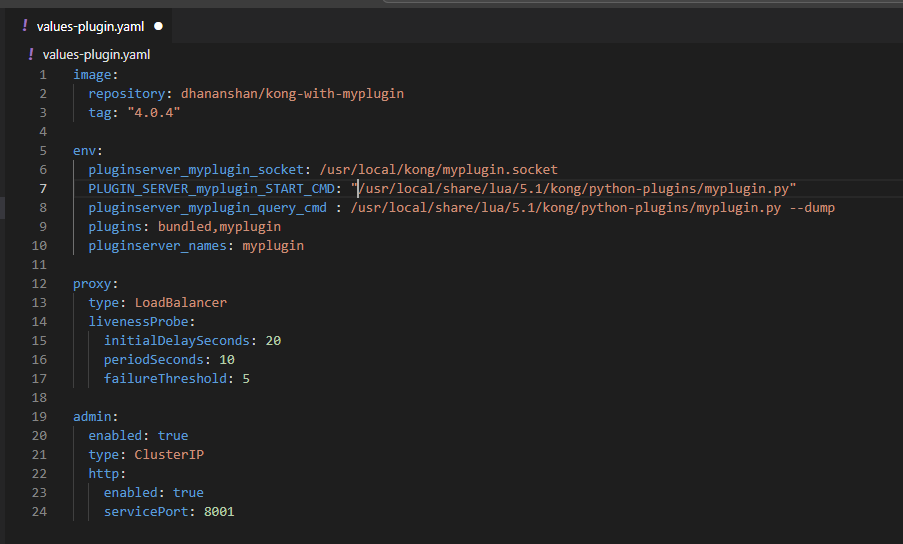
Step 5:
updated Kong with values file like below:
helm upgrade kong kong/kong --namespace kong -f values-plugin.yaml
I see the myplugin.py in the correct location but proxy pod is not working only if I enable the plugin. The reason is liveness and readiness probs fails and it keeps restarting.
Logs from proxy:
k logs kong-kong-696b666764-mjxcc -c proxy
2025/10/04 19:44:11 [warn] 1#0: the “user” directive makes sense only if the master process runs with super-user privileges, ignored in /kong_prefix/nginx.conf:7
nginx: [warn] the “user” directive makes sense only if the master process runs with super-user privileges, ignored in /kong_prefix/nginx.conf:7
2025/10/04 19:44:11 [notice] 1#0: [lua] license_helpers.lua:196: read_license_info(): [license-helpers] could not decode license JSON: No license found
2025/10/04 19:44:11 [notice] 1#0: [lua] license_helpers.lua:196: read_license_info(): [license-helpers] could not decode license JSON: No license found
Events:
12m Warning Unhealthy pod/kong-kong-696b666764-mjxcc Liveness probe failed: Get “http://:8100/status”: dial tcp :8100: connect: connection refused
13m Warning Unhealthy pod/kong-kong-696b666764-mjxcc Liveness probe failed: Get “http://:10254/healthz”: dial tcp 1:10254: connect: connection refused
12m Warning Unhealthy pod/kong-kong-696b666764-mjxcc Readiness probe failed: Get “http://:10254/readyz”: dial tcp :10254: connect: connection refused
3m39s Warning Unhealthy pod/kong-kong-696b666764-mjxcc Readiness probe failed: Get “http://1:8100/status/ready”: dial tcp :8100: connect: connection refused
am I missing anything? not much help I can find online.